Підключення до WireGuard VPN з Linux
Починаючи з версії KeeneticOS 3,3, можна використовувати тунель WireGuard VPN для віддаленого підключення до локальної мережі маршрутизатора Keenetic.
Важливо
Якщо ви плануєте налаштувати свій Keenetic як VPN-сервер, переконайтеся, що він має публічну IP-адресу, і, якщо ви використовуєте KeenDNS, що він працює в режимі Прямий доступ, який також вимагає публічної IP-адреси. Якщо будь-яка з цих умов не виконується, ви не зможете підключитися до такого сервера з Інтернету.
Спочатку вам потрібно налаштувати сервер WireGuard на пристрої Keenetic. Наступна інструкція показує цей процес: Налаштування WireGuard VPN між двома маршрутизаторами Keenetic. Потім перейдіть до налаштування VPN-клієнта.
Ось приклад підключення до VPN-сервера з операційної системи Linux, використовуючи CLI (термінал) для налаштування з’єднання в Ubuntu 18.04 LTS та графічний інтерфейс у дистрибутиві Linux Mint 19.3 LTS.
Щоб установити з’єднання з сервером WireGuard Keenetic на комп’ютері під керуванням Linux, ви повинні встановити пакет WireGuard за допомогою вбудованого менеджера пакетів apt.
Варіант встановлення та налаштування за допомогою терміналу
Запустіть термінал і встановіть необхідні пакети, необхідні для роботи WireGuard у терміналі, та налаштуйте з’єднання в графічному інтерфейсі NetworkManager (програма для керування мережевими з’єднаннями): пакет програми, модуль ядра, файли заголовків ядра.
Створіть Приватний ключ та Публічний ключ:
[my@my-wrk-lnv ~]$
cd /etc/wireguard/[my@my-wrk-lnv wireguard]$umask 077[my@my-wrk-lnv wireguard]$sudo -i[sudo] password for my: root@my-wrk-lnv:~#cd /etc/wireguard/root@my-wrk-lnv:/etc/wireguard#wg genkey > private-keyroot@my-wrk-lnv:/etc/wireguard#wg pubkey > public-key < private-keyroot@my-wrk-lnv:~#exit[my@my-wrk-lnv wireguard]$sudo cat private-keyAOSXWm+sXxRuu/Uo8lysE4PIwVZTRDD+YV6w3HicGHg= [my@my-wrk-lnv wireguard]$sudo cat public-keyxxKBcZlhZlbjW7yFuhZ08l294HBAp2I/iM05YE8vs0Y= [my@my-wrk-lnv wireguard]$cd -[my@my-wrk-lnv ~]$Важливо
Якщо після введення
cd /etc/wireguard/ви отримуєте результатДоступ заборонено, у вас немає root-доступу для читання каталогу.Змініть власника, який зможе отримати доступ до каталогу без прав root-доступу:
[my@my-wrk-lnv ~]$
sudo chown -R my /etc/wireguard/[my@my-wrk-lnv ~]$cd /etc/wireguard[my@my-wrk-lnvwireguard]$Після налаштування з’єднання ви можете змінити власника для доступу до каталогу за замовчуванням:
[my@my-wrk-lnv wireguard]$
cd - /home/my[my@my-wrk-lnv ~]$sudo chown -R root /etc/wireguard/Створіть файл конфігурації
wg-client.conf:[my@my-wrk-lnv wireguard]$
sudo touch wg-client.conf[my@my-wrk-lnv wireguard]$ls -1private-key public-keywg-client.confДодамо налаштування з’єднання до створеного файлу конфігурації
wg-client.conf, відкривши файл у текстовому редакторі, наприклад, nano:Налаштування [Інтерфейсу] клієнта:
У полі PrivateKey інтерфейсу клієнта введіть приватний ключ, створений на кроці 2.
Ключ можна переглянути за допомогою команди
cat:[my@my-wrk-lnv wireguard]$
sudo cat private-keyAOSXWm+sXxRuu/Uo8lysE4PIwVZTRDD+YV6w3HicGHg=У полі 'Addresses' інтерфейсу клієнта вкажіть IP-адресу у форматі IP/маска —
172.16.82.5/24(це внутрішня адреса тунелю). Можна використовувати іншу підмережу, але її потрібно вибрати з діапазону приватних адрес і уникати збігу з іншими підмережами, налаштованими на цих пристроях.Важливо
Якщо у вас налаштовано доступ до Інтернету через VPN-тунель WireGuard на стороні [Інтерфейсу] клієнта, ви повинні вказати DNS-сервер у полі DNS =.
У нашому прикладі адреса DNS-сервера від Google
8.8.8.8:[Interface] PrivateKey =AOSXWm+sXxRuu/Uo8lysE4PIwVZTRDD+YV6w3HicGHg= Address = 172.16.82.5/24 DNS = 8.8.8.8 [Peer] PublicKey = 1YVx+x3C817V9YdhUtpUhzyDLVj5tnK2m//WjFGynm4= AllowedIPs = 172.16.82.1/32, 192.168.22.0/24 Endpoint = enpwgwrkserver.dynns.com:16631 PersistentKeepalive = 5
Налаштування [Peer] сервера:
У полі Public keyPublic key вставте публічний ключ сервера, який можна скопіювати в буфер обміну з налаштувань WireGuard у вебінтерфейсі маршрутизатора:
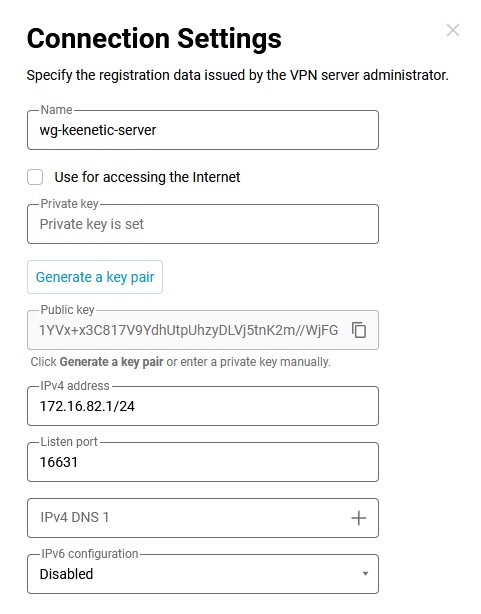
У полі AllowedIPs введіть дозволені IP-адреси у форматі IP/маска —
172.16.82.1/32(внутрішня адреса сервера) та192.168.22.0/24(адреса локального сегмента маршрутизатора Keenetic).У полі Endpoint введіть публічну IP-адресу або доменне ім’я сервера WireGuard та порт прослуховування, за яким клієнт WireGuard встановлюватиме зв’язок.
У полі PersistentKeepalive введіть частоту спроб перевірки доступності віддаленої сторони з’єднання. Зазвичай достатньо інтервалу між перевірками
3-5секунд.Налаштуйте віддалене з’єднання на стороні раніше налаштованого сервера WireGuard.
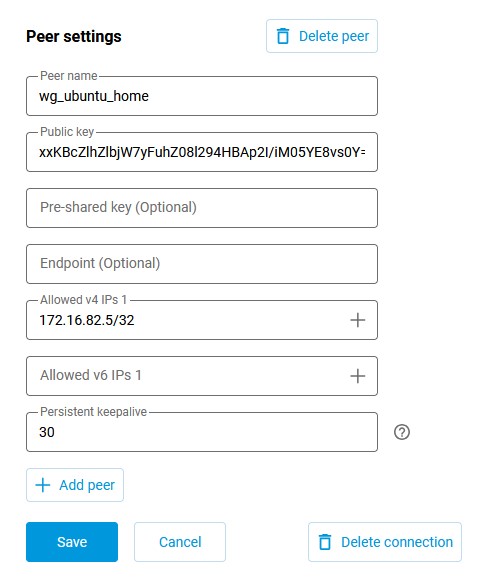
Підключіться до вебінтерфейсу маршрутизатора та перейдіть на сторінку Інші підключення в розділі Інтернет. Натисніть на раніше створене з’єднання WireGuard (
wg-keenetic-server) і додайте налаштування піра. Натисніть Додати пір, щоб відкрити вікно налаштувань піра, в якому ви вкажете назву тунелюwg-ubuntu-home.У полі Публічний ключ вставте ключ, створений на кроці 2.
Нагадуємо, ключ можна переглянути за допомогою команди
cat:[my@my-wrk-lnv wireguard]$
sudo cat public-keyxxKBcZlhZlbjW7yFuhZ08l294HBAp2I/iM05YE8vs0Y=У полі Дозволені адреси IPv4 вкажіть адресу, з якої буде дозволено трафік на сервер, у форматі IP/маска —
172.16.82.5/32У полі Постійна перевірка активності ви повинні вказати частоту спроб перевірки доступності віддаленої сторони з’єднання. Зазвичай достатньо інтервалу між перевірками
10-15секунд. Значення за замовчуванням для Постійна перевірка активності у налаштуваннях піра Keenetic становить30секунд.Натисніть Зберегти.
Створіть автоматичне з’єднання WireGuard під час запуску ОС за допомогою системи ініціалізації Systemd, яка дозволяє запускати демони системи Linux і керувати ними:
[my@my-wrk-lnv ~]$
sudo systemctl enable wg-quick@wg-client.serviceCreated symlink /etc/systemd/system/multi-user.target.wants/wg-quick@wg-client.service → /lib/systemd/system/wg-quick@.service.Важливо
В імені служби
***.serviceвведіть назву конфігураціїwg-client.confЗапустіть з’єднання WireGuard:
[my@my-wrk-lnv ~]$
sudo systemctl start wg-quick@wg-client.serviceВажливо
Якщо служба не запускається, перевірте журнал завантаження за допомогою команди
systemctl status wg-quick@wg-client.serviceабоjournalctl -xe:[my@my-wrk-lnv ~]$
systemctl status wg-quick@wg-client.servicewg-quick@wg-client.service - WireGuard via wg-quick(8) for wg/client Loaded: loaded (/lib/systemd/system/wg-quick@.service; indirect; vendor preset: enabled) Active: failed (Result: exit-code) since Wed 2020-04-22 19:55:59 MSK; 8s ago Docs: man:wg-quick(8)\ man:wg(8) https://www.wireguard.com/ https://www.wireguard.com/quickstart/ https://git.zx2c4.com/wireguard-tools/about/src/man/wg-quick.8 https://git.zx2c4.com/wireguard-tools/about/src/man/wg.8 Process: 8734 ExecStart=/usr/bin/wg-quick up wg-client (code=exited, status=127) Main PID: 8734 (code=exited, status=127) apr 22 19:55:59 my@my-wrk-lnv wg-quick[8734]: [#] ip link add wg-client type wireguard apr 22 19:55:59 my@my-wrk-lnv wg-quick[8734]: [#] wg setconf wg-client /dev/fd/63 apr 22 19:55:59 my@my-wrk-lnv wg-quick[8734]: [#] ip -4 address add 172.16.82.20/24 dev wg-client apr 22 19:55:59 my@my-wrk-lnv wg-quick[8734]: [#] ip link set mtu 1420 up dev wg-client apr 22 19:55:59 my@my-wrk-lnv wg-quick[8734]: [#] resolvconf -a wg-client -m 0 -xapr 22 19:55:59 my@my-wrk-lnv wg-quick[8734]: /usr/bin/wg-quick: line 31: resolvconf: command not foundapr 22 19:55:59 my@my-wrk-lnv wg-quick[8734]: [#] ip link delete dev wg-client apr 22 19:55:59 my@my-wrk-lnv systemd[1]: wg-quick@wg-client.service: Main process exited, code=exited, status=127/n/a apr 22 19:55:59 my@my-wrk-lnv systemd[1]: wg-quick@wg-client.service: Failed with result 'exit-code'. apr 22 19:55:59 my@my-wrk-lnv systemd[1]: Failed to start WireGuard via wg-quick(8) for wg/client.Згідно з помилкою, не встановлено пакет
resolvconf, необхідний дляwg-quick, встановіть пакет:Після встановлення пакета перевірте, чи працює служба. Перевірка з’єднання:
[my@my-wrk-lnv ~]$
sudo wginterface: wg-client public key: xxKBcZlhZlbjW7yFuhZ08l294HBAp2I/iM05YE8vs0Y= private key: (hidden) listening port: 45757 peer: 1YVx+x3C817V9YdhUtpUhzyDLVj5tnK2m//WjFGynm4= endpoint: 193.0.174.159:16631 allowed ips: 172.16.82.1/32, 192.168.22.0/24 transfer: 0 B received, 148 B sent persistent keepalive: every 5 secondsЩоб перевірити доступність сервера, ви можете надіслати пакети ICMP на IP-адресу:
[my@my-wrk-lnv ~]$
ping -c 10 -s 100 192.168.22.1PING 192.168.22.1 (192.168.22.1) 100(128) bytes of data. 108 bytes from 192.168.22.1: icmp_seq=1 ttl=64 time=6.76 ms 108 bytes from 192.168.22.1: icmp_seq=2 ttl=64 time=6.70 ms 108 bytes from 192.168.22.1: icmp_seq=3 ttl=64 time=6.63 ms 108 bytes from 192.168.22.1: icmp_seq=4 ttl=64 time=6.84 ms 108 bytes from 192.168.22.1: icmp_seq=5 ttl=64 time=6.57 ms 108 bytes from 192.168.22.1: icmp_seq=6 ttl=64 time=6.24 ms 108 bytes from 192.168.22.1: icmp_seq=7 ttl=64 time=9.92 ms 108 bytes from 192.168.22.1: icmp_seq=8 ttl=64 time=9.75 ms 108 bytes from 192.168.22.1: icmp_seq=9 ttl=64 time=5.77 ms 108 bytes from 192.168.22.1: icmp_seq=10 ttl=64 time=7.03 ms --- 192.168.22.1 ping statistics --- 10 packets transmitted, 10 received, 0% packet loss, time 9014ms rtt min/avg/max/mdev = 5.778/7.225/9.920/1.349 msЩоб вимкнути автоматичний запуск з’єднання WireGuard під час запуску ОС через систему ініціалізації Systemd, введіть таку команду:
[my@my-wrk-lnv ~]$
sudo systemctl disable wg-quick@wg-client.serviceRemoved /etc/systemd/system/multi-user.target.wants/wg-quick@wg-client.serviceЩоб зупинити з’єднання WireGuard, введіть таку команду:
[my@my-wrk-lnv ~]$
sudo systemctl stop wg-quick@wg-client.serviceНалаштування завершено.
Варіант встановлення та налаштування за допомогою NetworkManager
Графічний інтерфейс NetworkManager — це графічна оболонка для програмного забезпечення керування мережевими з’єднаннями.
Коротка послідовність команд:
git clone https://github.com/max-moser/network-manager-wireguardcd network-manager-wireguard./autogen.sh --without-libnm-glib./configure --without-libnm-glib --prefix=/usr --sysconfdir=/etc --libdir=/usr/lib/x86_64-linux-gnu --libexecdir=/usr/lib/NetworkManager --localstatedir=/varmakesudo make install
Важливо
Якщо встановлення плагіна не завершилося успішно, або якщо не вистачає пакетів для встановлення плагіна, запустіть:
sudo apt install wireguard git dh-autoreconf libglib2.0-dev intltool build-essential libgtk-3-dev libnma-dev libsecret-1-dev network-manager-dev resolvconf
Детальна послідовність команд:
Клонуйте код плагіна з репозиторію Github:
[my@my-wrk-lnv ~]$
git clone https://github.com/max-moser/network-manager-wireguardCloning into 'network-manager-wireguard'... remote: Enumerating objects: 534, done. remote: Total 534 (delta 0), reused 0 (delta 0), pack-reused 534 Receiving objects: 100% (534/534), 748.44 KiB | 1.63 MiB/s, done. Resolving deltas: 100% (317/317), done.Перейдіть до каталогу
network-manager-wireguardі скомпілюйте плагін для графічного налаштування тунелю Wireguard:[my@my-wrk-lnv ~]$
cd network-manager-wireguard[my@my-wrk-lnv network-manager-wireguard](master)$./autogen.sh --without-libnm-gliblibtoolize: putting auxiliary files in '.'. libtoolize: linking file './ltmain.sh' libtoolize: putting macros in AC_CONFIG_MACRO_DIRS, 'm4'. libtoolize: linking file 'm4/libtool.m4' libtoolize: linking file 'm4/ltoptions.m4' libtoolize: linking file 'm4/ltsugar.m4' libtoolize: linking file 'm4/ltversion.m4' libtoolize: linking file 'm4/lt~obsolete.m4' configure.ac:19: installing './compile' configure.ac:19: installing './config.guess' configure.ac:19: installing './config.sub' configure.ac:7: installing './install-sh' configure.ac:7: installing './missing' Makefile.am: installing './depcomp' parallel-tests: installing './test-driver' checking for a BSD-compatible install... /usr/bin/install -c checking whether build environment is sane... yes checking for a thread-safe mkdir -p... /bin/mkdir -p checking for gawk... gawk checking whether make sets $(MAKE)... yes checking whether make supports nested variables... yes checking whether UID '1000' is supported by ustar format... yes checking whether GID '1000' is supported by ustar format... yes checking how to create a ustar tar archive... gnutar checking whether to enable maintainer-specific portions of Makefiles... yes checking whether make supports nested variables... (cached) yes checking for gcc-ar... gcc-ar checking for gcc-ranlib... gcc-ranlib checking build system type... x86_64-pc-linux-gnu checking host system type... x86_64-pc-linux-gnu checking how to print strings... printf checking for style of include used by make... GNU checking for gcc... gcc checking whether the C compiler works... yes checking for C compiler default output file name... a.out checking for suffix of executables... checking whether we are cross compiling... no checking for suffix of object files... o checking whether we are using the GNU C compiler... yes checking whether gcc accepts -g... yes checking for gcc option to accept ISO C89... none needed checking whether gcc understands -c and -o together... yes checking dependency style of gcc... gcc3 checking for a sed that does not truncate output... /bin/sed checking for grep that handles long lines and -e... /bin/grep checking for egrep... /bin/grep -E checking for fgrep... /bin/grep -F checking for ld used by gcc... /usr/bin/ld checking if the linker (/usr/bin/ld) is GNU ld... yes checking for BSD- or MS-compatible name lister (nm)... /usr/bin/nm -B checking the name lister (/usr/bin/nm -B) interface... BSD nm checking whether ln -s works... yes checking the maximum length of command line arguments... 1572864 checking how to convert x86_64-pc-linux-gnu file names to x86_64-pc-linux-gnu format... func_convert_file_noop checking how to convert x86_64-pc-linux-gnu file names to toolchain format... func_convert_file_noop checking for /usr/bin/ld option to reload object files... -r checking for objdump... objdump checking how to recognize dependent libraries... pass_all checking for dlltool... no checking how to associate runtime and link libraries... printf %s\n checking for archiver @FILE support... @ checking for strip... strip checking for ranlib... (cached) gcc-ranlib checking command to parse /usr/bin/nm -B output from gcc object... ok checking for sysroot... no checking for a working dd... /bin/dd checking how to truncate binary pipes... /bin/dd bs=4096 count=1 checking for mt... mt checking if mt is a manifest tool... no checking how to run the C preprocessor... gcc -E checking for ANSI C header files... yes checking for sys/types.h... yes checking for sys/stat.h... yes checking for stdlib.h... yes checking for string.h... yes checking for memory.h... yes checking for strings.h... yes checking for inttypes.h... yes checking for stdint.h... yes checking for unistd.h... yes checking for dlfcn.h... yes checking for objdir... .libs checking if gcc supports -fno-rtti -fno-exceptions... no checking for gcc option to produce PIC... -fPIC -DPIC checking if gcc PIC flag -fPIC -DPIC works... yes checking if gcc static flag -static works... yes checking if gcc supports -c -o file.o... yes checking if gcc supports -c -o file.o... (cached) yes checking whether the gcc linker (/usr/bin/ld -m elf_x86_64) supports shared libraries... yes checking whether -lc should be explicitly linked in... no checking dynamic linker characteristics... GNU/Linux ld.so checking how to hardcode library paths into programs... immediate checking whether stripping libraries is possible... yes checking if libtool supports shared libraries... yes checking whether to build shared libraries... yes checking whether to build static libraries... no checking for gcc... (cached) gcc checking whether we are using the GNU C compiler... (cached) yes checking whether gcc accepts -g... (cached) yes checking for gcc option to accept ISO C89... (cached) none needed checking whether gcc understands -c and -o together... (cached) yes checking dependency style of gcc... (cached) gcc3 checking for glib-compile-resources... /usr/bin/glib-compile-resources checking for ANSI C header files... (cached) yes checking fcntl.h usability... yes checking fcntl.h presence... yes checking for fcntl.h... yes checking paths.h usability... yes checking paths.h presence... yes checking for paths.h... yes checking sys/ioctl.h usability... yes checking sys/ioctl.h presence... yes checking for sys/ioctl.h... yes checking sys/time.h usability... yes checking sys/time.h presence... yes checking for sys/time.h... yes checking syslog.h usability... yes checking syslog.h presence... yes checking for syslog.h... yes checking for unistd.h... (cached) yes checking for mode_t... yes checking for pid_t... yes checking whether time.h and sys/time.h may both be included... yes checking whether gcc needs -traditional... no checking for working memcmp... yes checking for select... yes checking for socket... yes checking for uname... yes checking for library containing dlopen... -ldl checking whether NLS is requested... yes checking for intltool >= 0.35... 0.51.0 found checking for intltool-update... /usr/bin/intltool-update checking for intltool-merge... /usr/bin/intltool-merge checking for intltool-extract... /usr/bin/intltool-extract checking for xgettext... /usr/bin/xgettext checking for msgmerge... /usr/bin/msgmerge checking for msgfmt... /usr/bin/msgfmt checking for gmsgfmt... /usr/bin/msgfmt checking for perl... /usr/bin/perl checking for perl >= 5.8.1... 5.26.1 checking for XML::Parser... ok checking locale.h usability... yes checking locale.h presence... yes checking for locale.h... yes checking for LC_MESSAGES... yes checking for CFPreferencesCopyAppValue... no checking for CFLocaleCopyCurrent... no checking libintl.h usability... yes checking libintl.h presence... yes checking for libintl.h... yes checking for ngettext in libc... yes checking for dgettext in libc... yes checking for bind_textdomain_codeset... yes checking for msgfmt... (cached) /usr/bin/msgfmt checking for dcgettext... yes checking if msgfmt accepts -c... yes checking for gmsgfmt... (cached) /usr/bin/msgfmt checking for xgettext... (cached) /usr/bin/xgettext checking for pkg-config... /usr/bin/pkg-config checking pkg-config is at least version 0.9.0... yes checking for GLIB... yes checking for GTK... yes checking for LIBNMA... yes checking for LIBSECRET... yes checking for LIBNM... yes checking for more warnings... yes checking whether -Wunknown-warning-option works as expected... not supported checking whether "-Wextra" works as expected... yes checking whether "-Wdeclaration-after-statement" works as expected... yes checking whether "-Wfloat-equal" works as expected... yes checking whether "-Wformat-nonliteral" works as expected... yes checking whether "-Wformat-security" works as expected... yes checking whether "-Wimplicit-fallthrough" works as expected... yes checking whether "-Wimplicit-function-declaration" works as expected... yes checking whether "-Winit-self" works as expected... yes checking whether "-Wlogical-op" works as expected... yes checking whether "-Wmissing-declarations" works as expected... yes checking whether "-Wmissing-include-dirs" works as expected... yes checking whether "-Wmissing-prototypes" works as expected... yes checking whether "-Wpointer-arith" works as expected... yes checking whether "-Wshadow" works as expected... yes checking whether "-Wshift-negative-value" works as expected... yes checking whether "-Wstrict-prototypes" works as expected... yes checking whether "-Wundef" works as expected... yes checking whether "-Wno-duplicate-decl-specifier" works as expected... yes checking whether "-Wno-format-truncation" works as expected... yes checking whether "-Wno-format-y2k" works as expected... yes checking whether "-Wno-missing-field-initializers" works as expected... yes checking whether "-Wno-pragmas" works as expected... yes checking whether "-Wno-sign-compare" works as expected... yes checking whether "-Wno-unused-but-set-variable" works as expected... yes checking whether "-Wno-unused-parameter" works as expected... yes checking whether -Wunknown-attributes works as expected... not supported checking whether -Wtypedef-redefinition works as expected... not supported checking whether -Warray-bounds works as expected... yes checking whether -Wparentheses-equality works as expected... not supported checking whether -Wunused-value works as expected... yes checking whether -Wmissing-braces works as expected... no checking if gcc supports flag -fdata-sections -ffunction-sections -Wl,--gc-sections in envvar CFLAGS... yes checking that generated files are newer than configure... done configure: creating ./config.status config.status: creating Makefile config.status: creating po/Makefile.in config.status: creating config.h config.status: executing depfiles commands config.status: executing libtool commands config.status: executing default-1 commands config.status: executing po/stamp-it commands Build configuration: --with-gnome=yes --with-libnm-glib=no --enable-absolute-paths=no --enable-more-warnings=yes --enable-lto=no --enable-ld-gc=yes[my@my-wrk-lnv network-manager-wireguard](master)$
./configure --without-libnm-glib --prefix=/usr --sysconfdir=/etc --libdir=/usr/lib/x86_64-linux-gnu --libexecdir=/usr/lib/NetworkManager --localstatedir=/varchecking for a BSD-compatible install... /usr/bin/install -c checking whether build environment is sane... yes checking for a thread-safe mkdir -p... /bin/mkdir -p checking for gawk... gawk checking whether make sets $(MAKE)... yes checking whether make supports nested variables... yes checking whether UID '1000' is supported by ustar format... yes checking whether GID '1000' is supported by ustar format... yes checking how to create a ustar tar archive... gnutar checking whether to enable maintainer-specific portions of Makefiles... no checking whether make supports nested variables... (cached) yes checking for gcc-ar... gcc-ar checking for gcc-ranlib... gcc-ranlib checking build system type... x86_64-pc-linux-gnu checking host system type... x86_64-pc-linux-gnu checking how to print strings... printf checking for style of include used by make... GNU checking for gcc... gcc checking whether the C compiler works... yes checking for C compiler default output file name... a.out checking for suffix of executables... checking whether we are cross compiling... no checking for suffix of object files... o checking whether we are using the GNU C compiler... yes checking whether gcc accepts -g... yes checking for gcc option to accept ISO C89... none needed checking whether gcc understands -c and -o together... yes checking dependency style of gcc... gcc3 checking for a sed that does not truncate output... /bin/sed checking for grep that handles long lines and -e... /bin/grep checking for egrep... /bin/grep -E checking for fgrep... /bin/grep -F checking for ld used by gcc... /usr/bin/ld checking if the linker (/usr/bin/ld) is GNU ld... yes checking for BSD- or MS-compatible name lister (nm)... /usr/bin/nm -B checking the name lister (/usr/bin/nm -B) interface... BSD nm checking whether ln -s works... yes checking the maximum length of command line arguments... 1572864 checking how to convert x86_64-pc-linux-gnu file names to x86_64-pc-linux-gnu format... func_convert_file_noop checking how to convert x86_64-pc-linux-gnu file names to toolchain format... func_convert_file_noop checking for /usr/bin/ld option to reload object files... -r checking for objdump... objdump checking how to recognize dependent libraries... pass_all checking for dlltool... no checking how to associate runtime and link libraries... printf %s\n checking for archiver @FILE support... @ checking for strip... strip checking for ranlib... (cached) gcc-ranlib checking command to parse /usr/bin/nm -B output from gcc object... ok checking for sysroot... no checking for a working dd... /bin/dd checking how to truncate binary pipes... /bin/dd bs=4096 count=1 checking for mt... mt checking if mt is a manifest tool... no checking how to run the C preprocessor... gcc -E checking for ANSI C header files... yes checking for sys/types.h... yes checking for sys/stat.h... yes checking for stdlib.h... yes checking for string.h... yes checking for memory.h... yes checking for strings.h... yes checking for inttypes.h... yes checking for stdint.h... yes checking for unistd.h... yes checking for dlfcn.h... yes checking for objdir... .libs checking if gcc supports -fno-rtti -fno-exceptions... no checking for gcc option to produce PIC... -fPIC -DPIC checking if gcc PIC flag -fPIC -DPIC works... yes checking if gcc static flag -static works... yes checking if gcc supports -c -o file.o... yes checking if gcc supports -c -o file.o... (cached) yes checking whether the gcc linker (/usr/bin/ld -m elf_x86_64) supports shared libraries... yes checking whether -lc should be explicitly linked in... no checking dynamic linker characteristics... GNU/Linux ld.so checking how to hardcode library paths into programs... immediate checking whether stripping libraries is possible... yes checking if libtool supports shared libraries... yes checking whether to build shared libraries... yes checking whether to build static libraries... no checking for gcc... (cached) gcc checking whether we are using the GNU C compiler... (cached) yes checking whether gcc accepts -g... (cached) yes checking for gcc option to accept ISO C89... (cached) none needed checking whether gcc understands -c and -o together... (cached) yes checking dependency style of gcc... (cached) gcc3 checking for glib-compile-resources... /usr/bin/glib-compile-resources checking for ANSI C header files... (cached) yes checking fcntl.h usability... yes checking fcntl.h presence... yes checking for fcntl.h... yes checking paths.h usability... yes checking paths.h presence... yes checking for paths.h... yes checking sys/ioctl.h usability... yes checking sys/ioctl.h presence... yes checking for sys/ioctl.h... yes checking sys/time.h usability... yes checking sys/time.h presence... yes checking for sys/time.h... yes checking syslog.h usability... yes checking syslog.h presence... yes checking for syslog.h... yes checking for unistd.h... (cached) yes checking for mode_t... yes checking for pid_t... yes checking whether time.h and sys/time.h may both be included... yes checking whether gcc needs -traditional... no checking for working memcmp... yes checking for select... yes checking for socket... yes checking for uname... yes checking for library containing dlopen... -ldl checking whether NLS is requested... yes checking for intltool >= 0.35... 0.51.0 found checking for intltool-update... /usr/bin/intltool-update checking for intltool-merge... /usr/bin/intltool-merge checking for intltool-extract... /usr/bin/intltool-extract checking for xgettext... /usr/bin/xgettext checking for msgmerge... /usr/bin/msgmerge checking for msgfmt... /usr/bin/msgfmt checking for gmsgfmt... /usr/bin/msgfmt checking for perl... /usr/bin/perl checking for perl >= 5.8.1... 5.26.1 checking for XML::Parser... ok checking locale.h usability... yes checking locale.h presence... yes checking for locale.h... yes checking for LC_MESSAGES... yes checking for CFPreferencesCopyAppValue... no checking for CFLocaleCopyCurrent... no checking libintl.h usability... yes checking libintl.h presence... yes checking for libintl.h... yes checking for ngettext in libc... yes checking for dgettext in libc... yes checking for bind_textdomain_codeset... yes checking for msgfmt... (cached) /usr/bin/msgfmt checking for dcgettext... yes checking if msgfmt accepts -c... yes checking for gmsgfmt... (cached) /usr/bin/msgfmt checking for xgettext... (cached) /usr/bin/xgettext checking for pkg-config... /usr/bin/pkg-config checking pkg-config is at least version 0.9.0... yes checking for GLIB... yes checking for GTK... yes checking for LIBNMA... yes checking for LIBSECRET... yes checking for LIBNM... yes checking for more warnings... yes checking whether -Wunknown-warning-option works as expected... not supported checking whether "-Wextra" works as expected... yes checking whether "-Wdeclaration-after-statement" works as expected... yes checking whether "-Wfloat-equal" works as expected... yes checking whether "-Wformat-nonliteral" works as expected... yes checking whether "-Wformat-security" works as expected... yes checking whether "-Wimplicit-fallthrough" works as expected... yes checking whether "-Wimplicit-function-declaration" works as expected... yes checking whether "-Winit-self" works as expected... yes checking whether "-Wlogical-op" works as expected... yes checking whether "-Wmissing-declarations" works as expected... yes checking whether "-Wmissing-include-dirs" works as expected... yes checking whether "-Wmissing-prototypes" works as expected... yes checking whether "-Wpointer-arith" works as expected... yes checking whether "-Wshadow" works as expected... yes checking whether "-Wshift-negative-value" works as expected... yes checking whether "-Wstrict-prototypes" works as expected... yes checking whether "-Wundef" works as expected... yes checking whether "-Wno-duplicate-decl-specifier" works as expected... yes checking whether "-Wno-format-truncation" works as expected... yes checking whether "-Wno-format-y2k" works as expected... yes checking whether "-Wno-missing-field-initializers" works as expected... yes checking whether "-Wno-pragmas" works as expected... yes checking whether "-Wno-sign-compare" works as expected... yes checking whether "-Wno-unused-but-set-variable" works as expected... yes checking whether "-Wno-unused-parameter" works as expected... yes checking whether -Wunknown-attributes works as expected... not supported checking whether -Wtypedef-redefinition works as expected... not supported checking whether -Warray-bounds works as expected... yes checking whether -Wparentheses-equality works as expected... not supported checking whether -Wunused-value works as expected... yes checking whether -Wmissing-braces works as expected... no checking if gcc supports flag -fdata-sections -ffunction-sections -Wl,--gc-sections in envvar CFLAGS... yes checking that generated files are newer than configure... done configure: creating ./config.status config.status: creating Makefile config.status: creating po/Makefile.in config.status: creating config.h config.status: config.h is unchanged config.status: executing depfiles commands config.status: executing libtool commands config.status: executing default-1 commands config.status: executing po/stamp-it commands Build configuration: --with-gnome=yes --with-libnm-glib=no --enable-absolute-paths=no --enable-more-warnings=yes --enable-lto=no --enable-ld-gc=yes[my@my-wrk-lnv network-manager-wireguard](master)$
makeXMLLINT not set and xmllint not found in path; skipping xml preprocessing. make all-recursive make[1]: Entering directory «/home/my/network-manager-wireguard» XMLLINT not set and xmllint not found in path; skipping xml preprocessing. Making all in . make[2]: Entering directory «/home/my/network-manager-wireguard» XMLLINT not set and xmllint not found in path; skipping xml preprocessing. CC shared/nm-utils/src_libnm_utils_la-nm-shared-utils.lo In file included from ./shared/nm-default.h:49:0, from shared/nm-utils/nm-shared-utils.c:22: /usr/include/libnm/nm-version.h:155:30: warning: "NM_VERSION_1_10_14" is not defined, evaluates to 0 [-Wundef] #if NM_VERSION_MAX_ALLOWED < NM_VERSION_1_10_14 ^~~~~~~~~~~~~~~~~~ CC shared/src_libnm_utils_la-utils.lo In file included from shared/nm-default.h:49:0, from shared/utils.c:22: /usr/include/libnm/nm-version.h:155:30: warning: "NM_VERSION_1_10_14" is not defined, evaluates to 0 [-Wundef] #if NM_VERSION_MAX_ALLOWED < NM_VERSION_1_10_14 ^~~~~~~~~~~~~~~~~~ CCLD auth-dialog/nm-wireguard-auth-dialog ITMRG appdata/network-manager-wireguard.metainfo.xml GEN nm-wireguard-service.name make[2]: Leaving directory «/home/my/network-manager-wireguard» Making all in po make[2]: Entering directory «/home/my/network-manager-wireguard/po» MSGFMT de.gmo MSGFMT en_GB.gmo make[2]: Leaving directory «/home/my/network-manager-wireguard/po» make[1]: Leaving directory «/home/my/network-manager-wireguard»Перезавантажте комп’ютер і перевірте доступність налаштувань Wireguard на панелі Мережеві підключення:
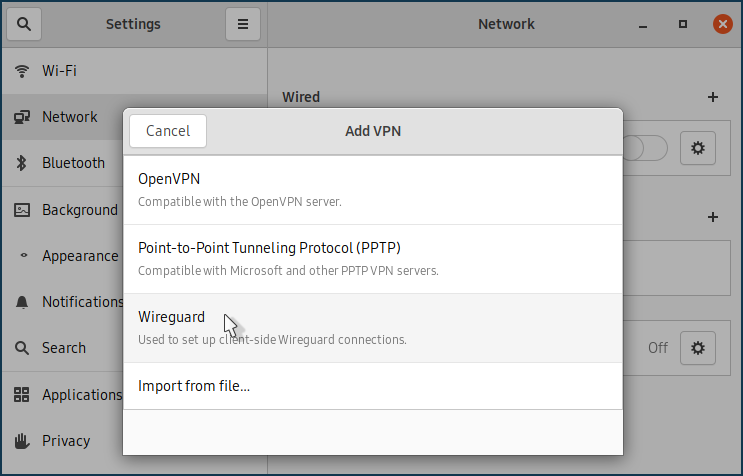
Налаштування підключення до сервера Wireguard:
Згенеруйте Приватний та Публічний ключі, як описано в розділі Варіант встановлення та налаштування за допомогою терміналу (крок 2).
Якщо ключі були раніше згенеровані в системі, вам потрібно буде переглянути їх у терміналі та по черзі скопіювати в буфер обміну:
[my@my-wrk-lnv wireguard]$
sudo cat private-key0CwJzxW0yOG4I9XWl9Wo9nzpxen2G0VlTAxD7XEBVmE= [my@my-wrk-lnv wireguard]$sudo cat public-keyM2LeCzN8mFLpa6Xz3BNHFgtNt8kY4wluiwt+NJFTgxk=Скопіюйте Приватний ключ і вставте його в поле Private Key налаштувань тунелю:
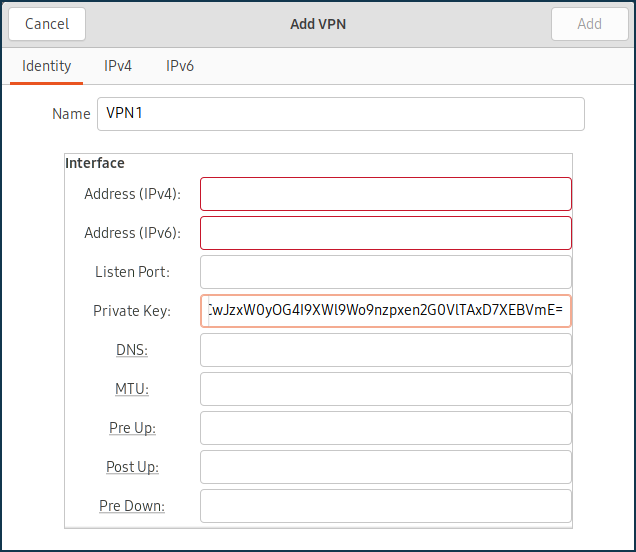
Скопіюйте публічний ключ і вставте його в раніше налаштований сервер WireGuard у поле Публічний ключ.
У полі Дозволені адреси IPv4 вкажіть адресу, з якої буде дозволено трафік на сервер, у форматі IP/маска —
172.16.82.8/32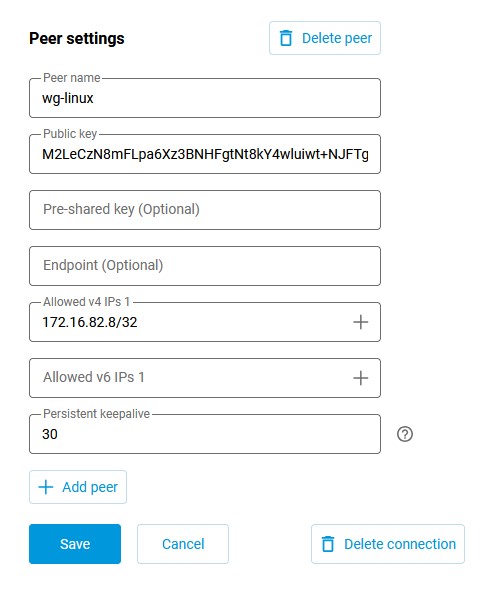
У полі Public Key введіть публічний ключ сервера, який можна скопіювати в буфер обміну вашого комп’ютера з налаштувань WireGuard у вебінтерфейсі маршрутизатора:
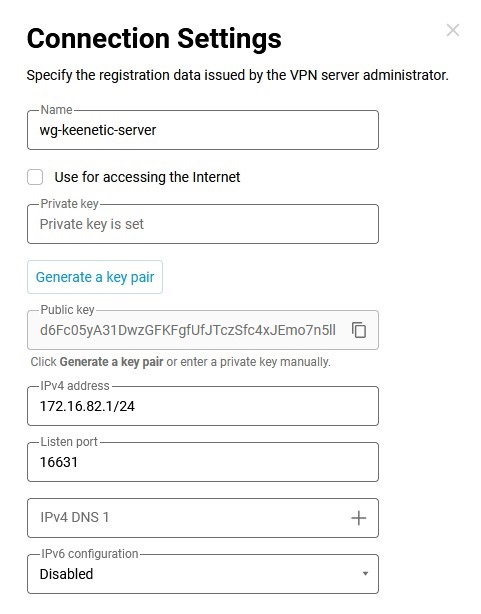
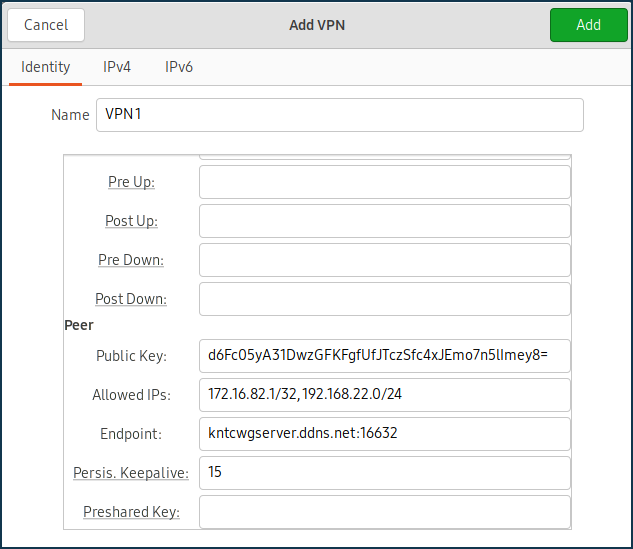
У полі Дозволені IP-адреси вкажіть дозволені IP-адреси у форматі IP/маска —
172.16.82.1/32(внутрішня адреса сервера) та192.168.22.0/24(адреса локального сегмента маршрутизатора Keenetic).У полі Endpoint вкажіть публічну IP-адресу або доменне ім’я сервера WireGuard та порт прослуховування, за яким клієнт WireGuard встановлюватиме з’єднання.
У полі PersistentKeepalive вкажіть частоту спроб перевірки доступності віддаленої сторони з’єднання. Зазвичай достатньо інтервалу між перевірками
3-5секунд.На вкладці IPv4 в розділі Маршрути додайте маршрут до сегмента локальної мережі маршрутизатора Keenetic:
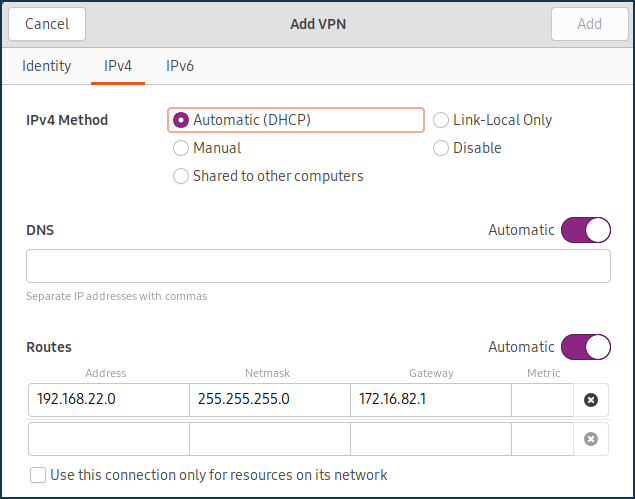
Підключіться до сервера Wireguard і переконайтеся, що повідомлень про помилки немає.
Щоб перевірити доступність сервера, ви можете надіслати пакети ICMP на IP-адресу локального сегмента вашого маршрутизатора Keenetic:
[my@my-wrk-lnv ~]$ ping -c 10 -s 100 192.168.22.1
PING 192.168.22.1 (192.168.22.1) 100(128) bytes of data.
108 bytes from 192.168.22.1: icmp_seq=1 ttl=64 time=5.40 ms
108 bytes from 192.168.22.1: icmp_seq=2 ttl=64 time=6.60 ms
108 bytes from 192.168.22.1: icmp_seq=3 ttl=64 time=7.99 ms
108 bytes from 192.168.22.1: icmp_seq=4 ttl=64 time=7.04 ms
108 bytes from 192.168.22.1: icmp_seq=5 ttl=64 time=6.31 ms
108 bytes from 192.168.22.1: icmp_seq=6 ttl=64 time=7.42 ms
108 bytes from 192.168.22.1: icmp_seq=7 ttl=64 time=6.55 ms
108 bytes from 192.168.22.1: icmp_seq=8 ttl=64 time=7.14 ms
108 bytes from 192.168.22.1: icmp_seq=9 ttl=64 time=8.47 ms
108 bytes from 192.168.22.1: icmp_seq=10 ttl=64 time=7.52 ms
--- 192.168.22.1 ping statistics ---
10 packets transmitted, 10 received, 0% packet loss, time 9015ms
rtt min/avg/max/mdev = 5.402/7.049/8.470/0.834 ms