Your mobile device can't see the 5 GHz Wi-Fi network?
When using a 5 GHz access point in the dual-band Keenetic, 17 working channels from 36 to 165 are available (frequency range from 5.180 GHz to 5.825 GHz). By default, automatic channel selection mode is enabled.
Nowadays, there are still many mobile devices (Samsung, Apple, etc.) which can work on a 5 GHz network but do not support channels above 140 (and some devices do not support a 5 GHz network on channels above 56 or 48).
The same situation is possible when using an outdated Wi-Fi client adapter driver.
We can assume that a Keenetic's 5 GHz access point automatically selects a channel above 140 (e.g., 149), and the mobile client will not see the access point then.
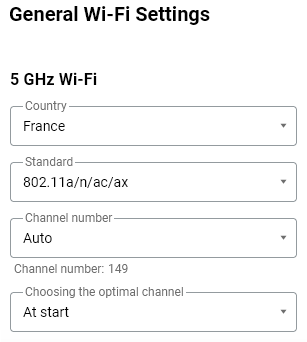
Management → System Settings → Wi-Fi
Log in to your router’s web interface and go to the System Settings page, then select the Wi-Fi tab. In the 5 GHz Wi-Fi section, check which channel the access point is using.
Try manually setting the channel number below 56 (e.g., 36, 48, or 52). You can do this in the Channel number field.
Then check whether the 5 GHz access point is available for connection.
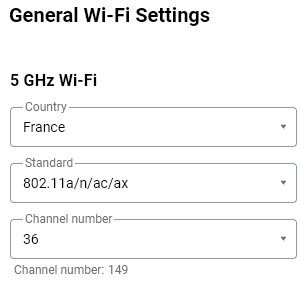
Management → System Settings → Wi-Fi
Tip
If your Raspberry Pi microcomputer does not see a Wi-Fi network in the 5GHz band, try to set the Wi-Fi region = US in its settings to work with 5GHz networks (for example, in the Raspbian Booster OS you can do this through the terminal and the command sudo raspi-config).
Notice
This article explains how to configure OS versions 5.1 and above. Instructions for earlier OS versions can be found in the article ???.